Upsert Records

Overview
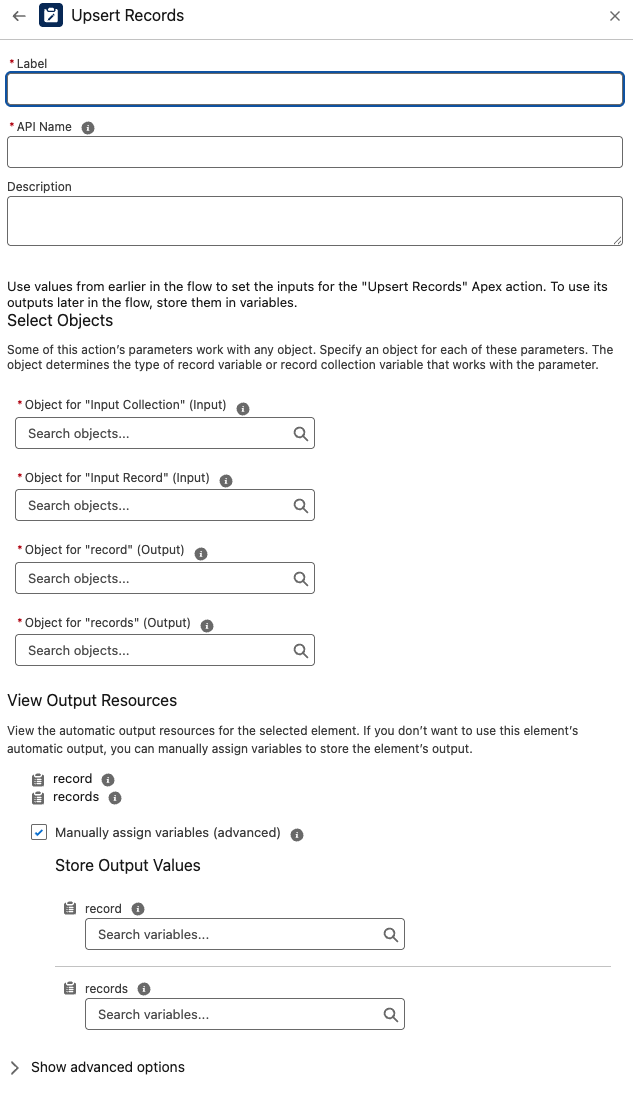
The Upsert Records component upserts Salesforce records using an External Id field.
It supports single records, collections, or JSON (serialized) data, and includes options to deduplicate input by external id and to enforce all-or-none transaction behavior.
Use this when you need a robust, flexible upsert in Flow without building separate branches for insert vs update.
Note: The standard flow update component does support checking for matching records, however this component removes duplicate keys from your list before upserting where the standard component does not.
Inputs
You may provide one of the following payload inputs:
-
inputCollection (Optional)
A collection of SObjects to upsert. -
inputRecord (Optional)
A single SObject to upsert. -
serializedRecordData (Optional)
A JSON string representing either a single record or a collection of records.- Keys must be valid field API names for the target object.
Provide exactly one of
inputCollection,inputRecord, orserializedRecordData.
Additional required/optional inputs:
-
objectName (Required)
The API name of the target object (e.g.,Account,Opportunity,CustomObject__c). -
externalIdFieldName (Required)
The API name of the External Id field to match on (e.g.,External_Id__c).- If a matching record exists → update.
- If not → insert.
-
allOrNone (Optional, Boolean)
If true, the entire operation must succeed; otherwise the transaction is rolled back. -
removeDuplicates (Optional, Boolean)
If true, duplicate external ids in the input are removed before upsert, saving DML and avoiding errors.
Outputs
-
record
The upserted SObject when a single record was provided. -
records
The upserted SObjects when a collection or serialized collection was provided.
Behavior
- Performs upsert by External Id on the object specified by objectName.
- Accepts SObject(s) directly or via JSON (serializedRecordData).
- Optionally deduplicates by external id (removeDuplicates = true).
- Honors all-or-none semantics when requested.
Examples
A) Upsert a single Account by External Id
Inputs
- inputRecord: Account SObject with fields (including External_Id__c)
- objectName: Account
- externalIdFieldName: External_Id__c
- allOrNone: true
Output
- record: the upserted Account
B) Upsert a JSON array of Opportunities
Inputs
- serializedRecordData:
  [
    {"Name":"FY25 Renewal - Acme","StageName":"Prospecting","CloseDate":"2025-08-31","External_Id__c":"OPP-1001"},
    {"Name":"FY25 Expansion - Globex","StageName":"Qualification","CloseDate":"2025-09-15","External_Id__c":"OPP-1002"}]
-
objectName: Opportunity
-
externalIdFieldName: External_Id__c
-
removeDuplicates: true
Output
- records: the upserted Opportunities
Best Practices
-
External Id discipline: Ensure the
externalIdFieldNameis populated in your input for deterministic upserts. -
Validate JSON: When using
serializedRecordData, confirm keys are valid field API names. -
Choose one input source: Provide only one of
inputCollection,inputRecord, orserializedRecordData. -
Use deduplication: Set
removeDuplicates = truewhen payloads may contain repeated external ids. -
Transactions: Use
allOrNone = truewhen you require atomicity; otherwise leave it false for partial success.
Troubleshooting
-
“Required field missing” → Confirm
objectNameandexternalIdFieldNameare provided. -
No records upserted → Ensure your payload is supplied via exactly one input and that External Id values are present.
-
Field API errors → Align JSON keys / SObject fields with the target object’s schema.
-
Duplicate value errors → Enable
removeDuplicatesto collapse repeated external ids within the input.
Example Scenario – Syncing External CRM Accounts
Scenario Overview:
A Salesforce org integrates with an external CRM that maintains account records with unique external identifiers. When syncing data, Salesforce needs to update existing accounts if they already exist (matched by External Id) or insert new accounts if they don’t. The integration may also send multiple records in a single payload.
Implementation with Upsert Records Component:
- Flow Setup for Account Sync:
- Create a Salesforce flow triggered when account data is received from the external CRM (e.g., via an HTTP callout or middleware integration).
- Adding Upsert Records Component:
- Incorporate the Upsert Records component into the flow to handle both insert and update operations without branching logic.
- Configuring Input:
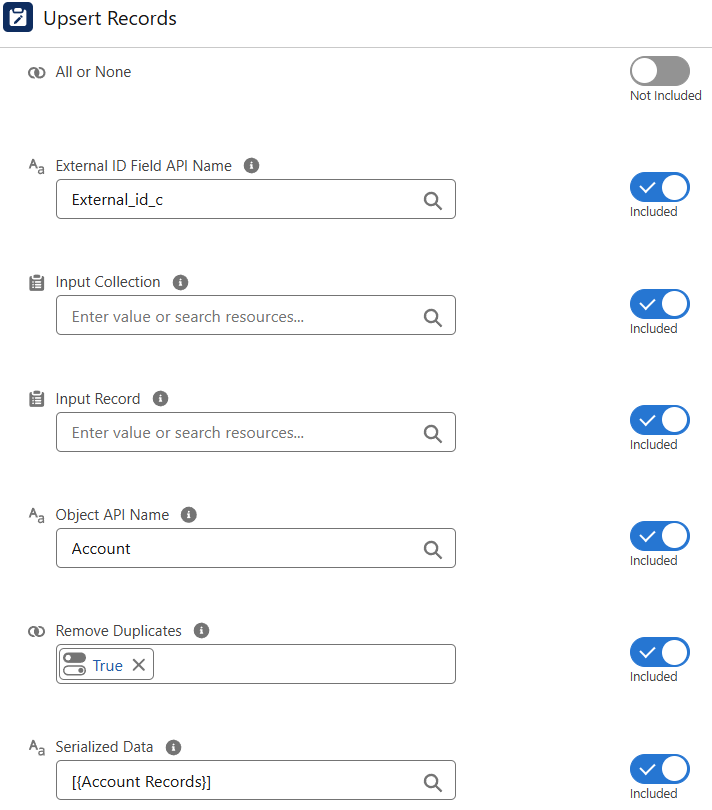
-
serializedRecordDatais set to the JSON array of account records received from the CRM. -
objectNameis set toAccount. -
externalIdFieldNameis set to the API name of the External Id field, such asExternal_Id__c. -
removeDuplicates = trueto eliminate duplicate external ids in the payload. -
allOrNone = falseto allow partial success if some records fail.
-
Executing Upsert:
The component parses the JSON, deduplicates by external id, and performs upsert operations. Existing accounts are updated; new accounts are inserted. -
Utilizing Results:
Therecordsoutput contains the upserted Account SObjects. Flow can then log results, send notifications, or trigger downstream processes based on the outcome.