Convert to JSON Collection

Overview
The JSON to Collection component converts one or more JSON array strings into Salesforce text collections.
It is useful when working with API responses or custom integrations that return JSON arrays, which you want to split into individual JSON records for iteration within Salesforce Flow.
For example, an external system might return an array of accounts in JSON. This component transforms the array into a Flow collection of text items, where each item is one serialized JSON object.
Inputs
You may provide up to 5 JSON array strings. Each should be a valid JSON array ([...]) containing JSON objects.
-
jsonStringToConvert (Required)
- A JSON array string (e.g.,
[{"Name":"Acme"},{"Name":"GlobalTech"}]).
- A JSON array string (e.g.,
-
jsonStringToConvert02–05 (Optional)
- Additional JSON array strings to convert if needed.
- Allows handling multiple separate arrays in one Flow execution.
Outputs
For each JSON input string, the component outputs a corresponding collection of strings:
- JSONCollection – A collection of strings for
jsonStringToConvert. - JSONCollection02–05 – Collections for inputs 02–05, if provided.
Each collection element is a serialized JSON object string.
Example Scenario - Processing API Response Arrays
Scenario Overview A Salesforce org integrates with an external HR system that provides employee data in JSON format. The system’s API returns employee records as a JSON array. The Flow needs to process each employee record individually to either update or insert them into Salesforce.
Implementation with Convert to JSON Collection Component:
- Flow Setup for API Response Handling:
- Create a Salesforce flow triggered after receiving the JSON array payload from the external HR system via an Apex action or HTTP callout.
- Adding Convert to JSON Collection Component:
- Incorporate the Convert to JSON Collection component into the flow to split the array into a collection of text values.
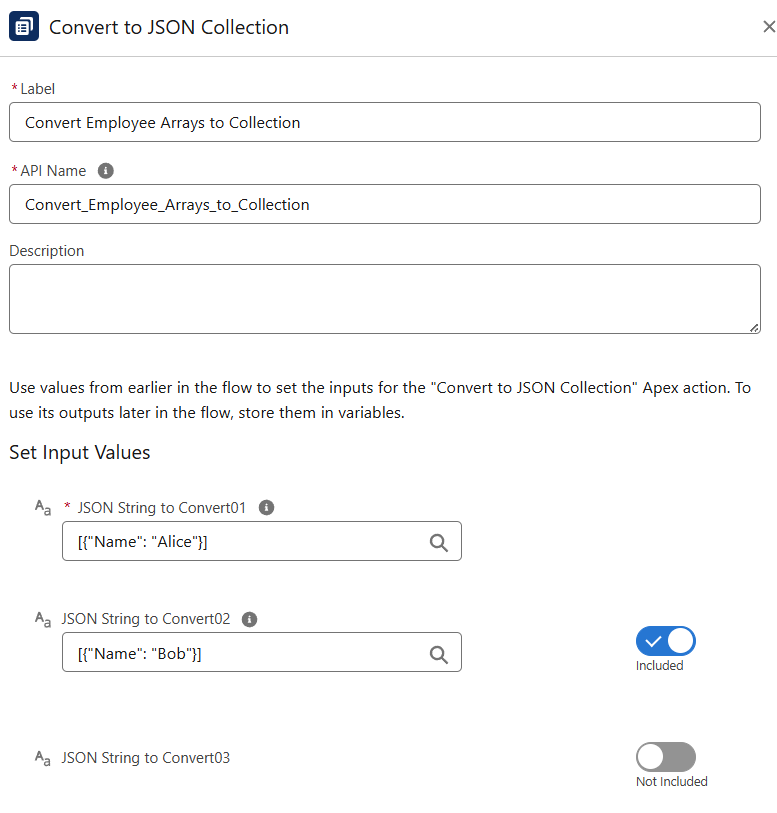
- Configuring Input:
-
jsonStringToConvertis set to the JSON array received from the external system (e.g.,[{"Name":"Alice"},{"Name":"Bob"}]). -
If multiple arrays are returned (e.g., employees and departments), map each to
jsonStringToConvert01–05.
- Utilizing Converted Data:
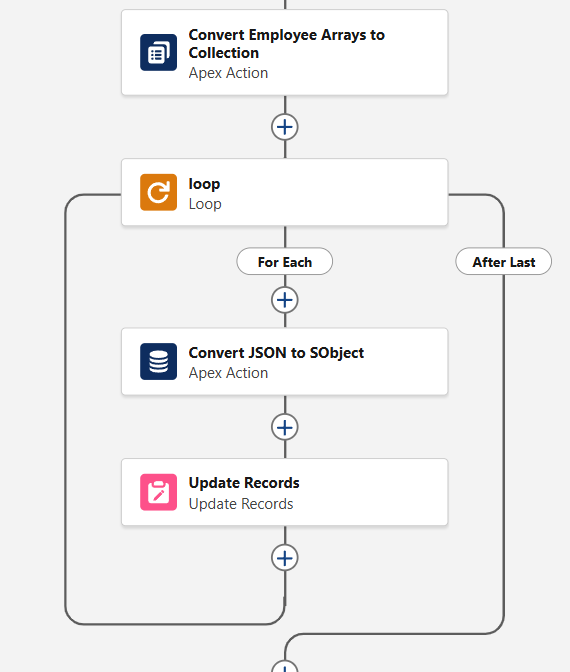
- Loop over the output
JSONCollectionin Flow. Each loop iteration processes one JSON object string, which can be passed into Convert JSON to SObject (e.g., to build Contact or Employee__c records) and then inserted/updated in Salesforce.