Convert JSON to SObject

Overview
This component converts a JSON string into a Salesforce SObject. You specify the target SObject type and provide a JSON payload with keys matching field API names. The component parses the JSON and returns a populated SObject instance for Flow or Apex to process (e.g., create or update).
Notes: This action does not perform DML. It only returns a populated SObject so your Flow (or subsequent Apex) can decide whether to create, update, validate, or branch.
Inputs
-
jsonString
A JSON string representing field/value pairs for the target SObject.- Keys should be Salesforce field API names (e.g.,
AccountId,CloseDate,Custom_Field__c). - Nested JSON is not automatically dereferenced into related records—use flat key/value pairs for direct fields.
- Keys should be Salesforce field API names (e.g.,
-
sobjectType
The API name of the SObject to construct (e.g.,Account,Opportunity,Case,CustomObject__c).
Output
- sObjectOut
An SObject of the specified type, populated from the JSON. The record is not saved; use Flow (Create/Update) or Apex DML to persist.
Behavior & Field Handling
-
Parsing & Mapping
- The action deserializes
jsonStringand maps keys to fields on the specifiedsobjectType. - Unknown or misspelled field API names will not map and may raise an error.
- The action deserializes
-
Data Types
- Text/Number/Boolean: Parsed directly when valid.
- Date/DateTime: Expects ISO-8601-style strings (e.g.,
2025-07-31,2025-07-31T14:35:00.000Z).- Milliseconds are safely handled; if present they are removed before returning a
Z-suffixed UTC value.
- Milliseconds are safely handled; if present they are removed before returning a
- Lookup/ID: Provide a valid 15 or 18-char Salesforce ID.
- Picklists: Provide a valid picklist value (case-sensitive rules depend on org settings).
-
No DML
- This component returns the SObject; it does not call
insert/update. Flow builder allows you to insert your own DML chains using the returned SObject.
- This component returns the SObject; it does not call
-
Errors
- Throws
ConvertoSObjectExceptionon invalid input (e.g., malformed JSON, invalid field/value formats).
- Throws
Example Scenario - Creating Opportunities From External Orders
Scenario Overview
A Salesforce org receives order data from an external e-commerce platform. The platform sends JSON payloads containing order details. These need to be converted into Salesforce Opportunity records for pipeline tracking
Implementation with Convert JSON to SObject component
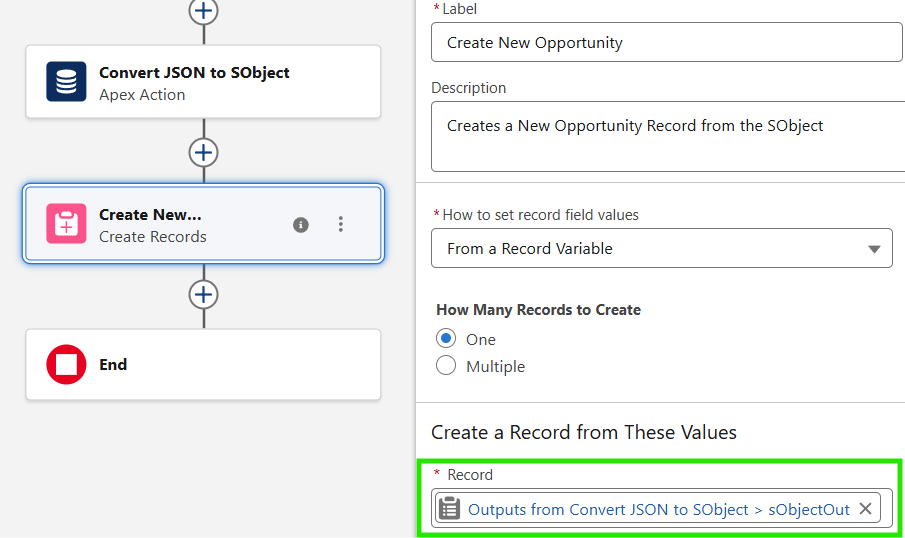
- Flow Setup for Order Processing:
- Create a Salesforce flow triggered when a new order JSON payload is received (e.g., through an Apex action or Platform Event).
- Add Convert JSON to SObject Component
- Incorporate the Convert JSON to SObject component into the flow to transform the incoming JSON into a Salesforce SObject.
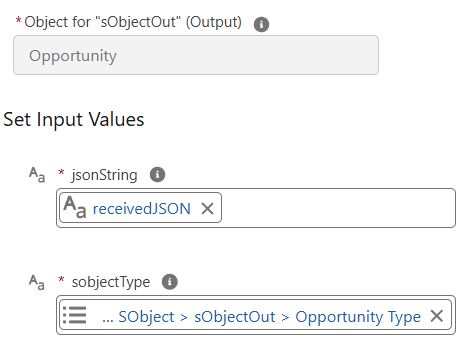
- Configuring Input:
jsonStringis set to the JSON payload received from the external systemsObjectTypeis set to Opportunity
- Executing JSON to SObject Conversion:
- The component parses the JSON string and returns a populated Opportunity SObject with mapped field values.
- Utilizing Converted Data:
- The
sObjectOutoutput is passed to a Create Records element, which inserts the Opportunity into Salesforce. Additional Flow logic can validate fields or branch on business rules before committing the record.