Start Transaction

Overview
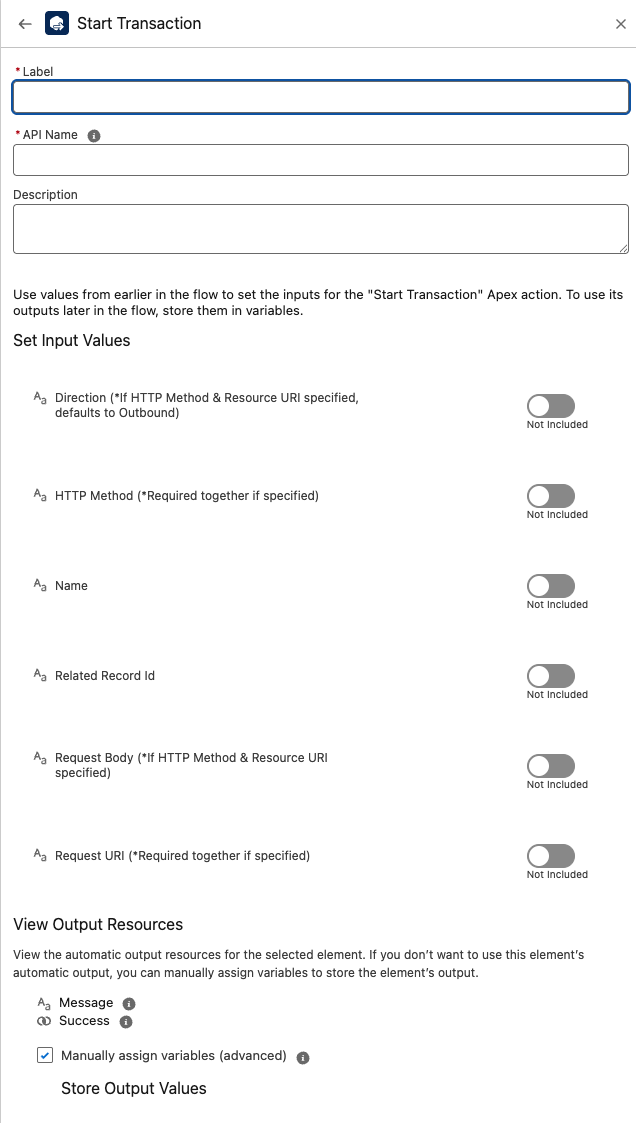
The Start Transaction component begins a Plinqx transaction from Flow.
Use it to open a transaction context for an integration or process step, optionally describing the HTTP request you intend to make (method, URI, body) and the related Salesforce record.
Once started, downstream steps (Flows/Apex) can reference the same transaction to correlate activity and outcomes.
Inputs
-
name (Optional)
A friendly name for the transaction/event.Not required if a transaction was already started earlier in the flow.
-
direction (Optional)
The transaction direction: e.g.,InboundorOutbound.- If you provide HTTP Method & Request URI, the direction defaults to
Outbound. - Not required if the transaction is already started.
- If you provide HTTP Method & Request URI, the direction defaults to
-
relatedRecordId (Optional)
The Salesforce record Id this transaction relates to (e.g.,Case,Opportunity, custom object).
Useful for linking logs, context, and follow-up actions. -
httpMethod (Optional; paired)
The HTTP method for this transaction, e.g.,GET,POST,PATCH,DELETE.Required together with Request URI when specified.
-
requestUri (Optional; paired)
The Request URI to be associated with the transaction.Required together with HTTP Method when specified.
-
requestBody (Optional)
The HTTP request body (typically JSON) to store with the transaction when relevant.Only applicable when you also supply an HTTP method & URI.
Outputs
-
success
True when the transaction was started successfully; otherwise false. -
message
A human-readable status or error message (e.g., validation issues, subscription messages, or general status).
Behavior
- Initializes a Plinqx transaction with the metadata you provide (name, direction, related record).
- When HTTP Method and Request URI are supplied, the action records request metadata (and optionally the requestBody) and treats the direction as Outbound by default.
- Designed to be the first step in a transaction flow; subsequent steps can update/complete the transaction.
Example — Start an Outbound API Transaction
Inputs
- name: Order Sync to ERP
- relatedRecordId: 006xx00000ABC123 (Opportunity)
- httpMethod: POST -requestUri: /erp/api/v1/orders
- requestBody:
{"orderNumber":"SO-10045","total":2500.00}
Outputs
-
success:true -
message:Transaction started
Example — Start an Inbound Transaction Linked to a Case
Inputs
-
name:Email Webhook Received -
direction:Inbound -
relatedRecordId:500xx00000AAA111(Case)
Outputs
-
success:true -
message:Transaction started
Best Practices
-
Pair HTTP fields: If you set
httpMethod, also setrequestUri(and vice versa). -
Attach context: Always provide
relatedRecordIdwhen the transaction ties to a specific business record. -
Name consistently: Use a clear, predictable
nameto make logs and monitoring easier. -
Order of operations: Call Start Transaction before any step that should be correlated to the same transaction.
Troubleshooting
-
success = false→ Checkmessagefor validation details (e.g., missing paired fields, invalid record Id). -
Direction not honored → If
httpMethodandrequestUriare set, direction defaults to Outbound; explicitly passInboundonly when you’re not providing HTTP metadata. -
No linkage → Provide
relatedRecordIdto ensure your transaction is visible alongside the relevant record.