Save JSON SObject(s)

Overview
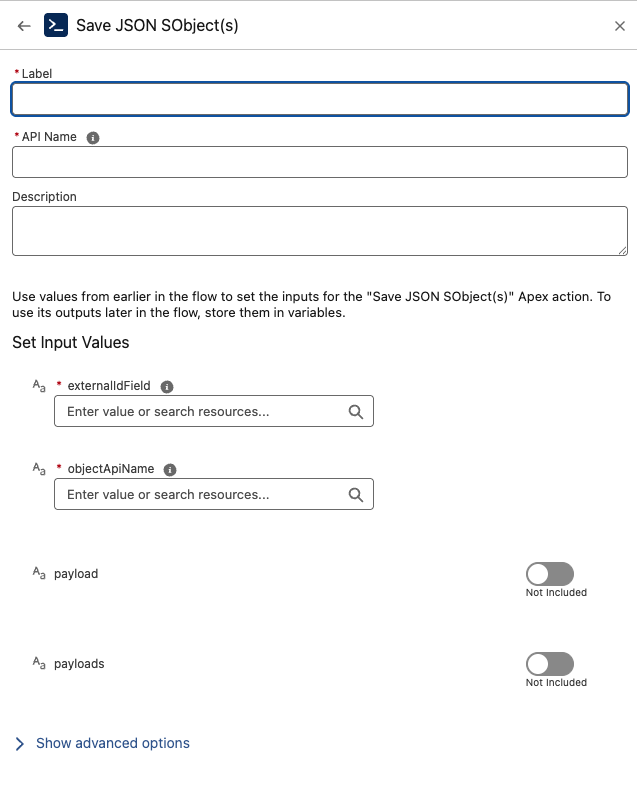
The Save JSON SObject(s) component takes a JSON payload (or multiple payloads) and directly upserts Salesforce records by matching on an External Id field (or the record Id).
This enables Flows and integrations to insert or update records from JSON without additional Apex or manual parsing. It is especially useful for API-driven use cases, bulk imports, or working with external systems that exchange JSON data.
Inputs
-
objectApiName (Required)
The API name of the target object, e.g.,Account,Opportunity,CustomObject__c. -
externalIdField (Required)
The API name of the field used to match existing records (e.g.,External_Id__c, orId).- If a record with this value exists → it is updated.
- If not → a new record is inserted.
-
payload (Optional)
A single JSON string representing one record.
Example:
{"Name":"Acme Inc","Industry":"Manufacturing","External_Id__c":"12345"}
- payloads (Optional)
A list of JSON strings, each representing one record.
Example:
[
  {"Name":"Acme Inc","Industry":"Manufacturing","External_Id__c":"12345"},
  {"Name":"GlobalTech","Industry":"Technology","External_Id__c":"67890"}
]
Provide either payload or payloads.
Outputs
This action does not return records. It performs the upsert operation.
If you need per-record results (success/failure/Ids), use JsonToSObjectWithResponse.
Best Practices
-
Ensure
externalIdFieldis defined on the target object and populated in the JSON. -
JSON keys must match field API names on
objectApiName. -
For response details, prefer JsonToSObjectWithResponse.
-
Consider governor limits for large
payloadslists.
Troubleshooting
-
Malformed JSON → Fix the JSON syntax.
-
Missing external id → Upsert can’t match; provide a value for
externalIdField. -
Field API mismatches → Align JSON keys with the object schema.
Example Scenario - Bulk Import of Partner Accounts
Scenario Overview:
A Salesforce org receives partner account data from an external partner portal. The portal sends the records in JSON format, using a shared External_Id__c field to uniquely identify accounts across both systems. Salesforce needs to insert new accounts or update existing ones in bulk, without writing Apex or manually parsing JSON.
Implementation with Save JSON SObject(s) Component:
Flow Setup for Partner Data Import:
Create a Salesforce flow triggered when the partner portal uploads a JSON file or when middleware delivers a JSON payload.
Adding Save JSON SObject(s) Component:
Incorporate the Save JSON SObject(s) component into the flow to upsert the records directly from the JSON payload.
Configuring Input:
-
objectApiNameis set toAccount. -
externalIdFieldis set toExternal_Id__c. -
payloadsis set to the JSON array of partner accounts, for example:
[ {"Name":"Acme Inc","Industry":"Manufacturing","External_Id__c":"12345"}, {"Name":"GlobalTech","Industry":"Technology","External_Id__c":"67890"} ]
Executing Save JSON SObject(s):
The component parses the JSON and performs upserts:
-
If an account with
External_Id__c = 12345or67890already exists, it is updated. -
If no matching record exists, a new account is inserted.
Utilizing Results:
The component completes the upsert operation silently without returning records. The Flow can continue with logging, notifications, or triggering downstream processes once the import is done.