Save JSON SObject(s) with Record Ids (Response)

Overview
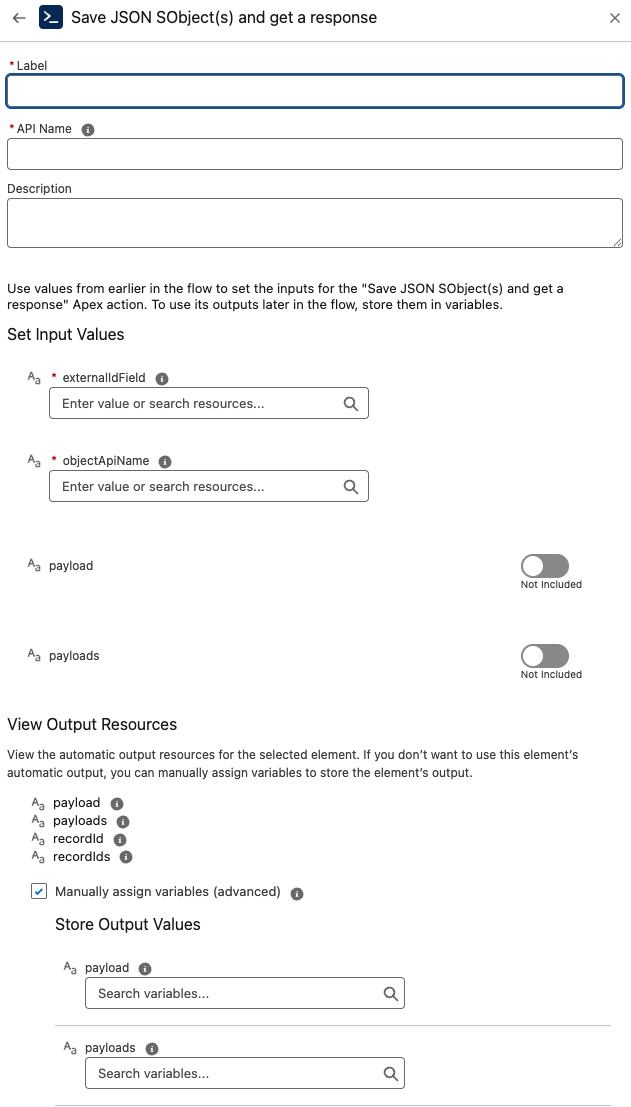
The Save JSON SObject(s) with Record Ids component takes a JSON payload (or multiple payloads) and upserts Salesforce records by matching on an External Id field (or the record Id).
Unlike the basic version, this action returns the created/updated record Id(s) so your Flow can branch or continue processing with certainty.
Inputs
-
objectApiName (Required)
The API name of the target object, e.g.,Account,Opportunity,CustomObject__c. -
externalIdField (Required)
The API name of the field used to match existing records (e.g.,External_Id__c, orId).- If a record with this value exists → it is updated.
- If not → a new record is inserted.
-
payload (Optional)
A single JSON string representing one record.
Example:
{"Name":"Acme Inc","Industry":"Manufacturing","External_Id__c":"12345"}
- payloads (Optional)
A list of JSON strings, each representing one record.
Example:
[
  {"Name":"Acme Inc","Industry":"Manufacturing","External_Id__c":"12345"},
  {"Name":"GlobalTech","Industry":"Technology","External_Id__c":"67890"}
]
Provide either payload or payloads.
Outputs
A Response is returned per request containing:
-
recordId — The Id of the upserted record (when using
payload). -
recordIds — The Ids of all upserted records (when using
payloads). -
payload / payloads — Echo of the input(s) for traceability.
Behavior
-
Upserts by
externalIdField(orId) onobjectApiName. -
Supports both single and bulk JSON payloads.
-
Performs a subscription check before execution.
-
Throws
JsonToSObjectWithRecordIdsExceptionon errors (malformed JSON, missing required fields, etc.).
Best Practices
-
Ensure
externalIdFieldis defined and populated in each JSON record for deterministic upserts. -
JSON keys must match field API names on the target
objectApiName. -
For large batches, be mindful of governor limits; consider chunking in Flow or invoking asynchronously when appropriate.
-
Always check the returned recordId(s) before proceeding to dependent actions.
Troubleshooting
-
Malformed JSON → Correct the JSON syntax.
-
Missing external id → Upsert cannot match; provide a value for
externalIdField. -
Field API mismatches → Align JSON keys with the object schema.
-
No Ids returned → Verify that either
payloadorpayloadswas provided and that the upsert executed successfully.
Example Scenario – Bulk Upsert and Relate Accounts to Contacts
Scenario Overview:
A Salesforce org receives bulk account data from an external system. Each record has a unique External_Id__c. After inserting or updating the accounts, the Flow also needs the Salesforce record Ids so that child Contact records can be related correctly.
Implementation with Save JSON SObject(s) with Record Ids Component:
Flow Setup for Data Sync:
Create a Salesforce flow triggered when the external system delivers a JSON payload of accounts.
Adding Save JSON SObject(s) with Record Ids Component:
Incorporate the component into the flow to perform upserts and return the Salesforce Ids of the created or updated records.
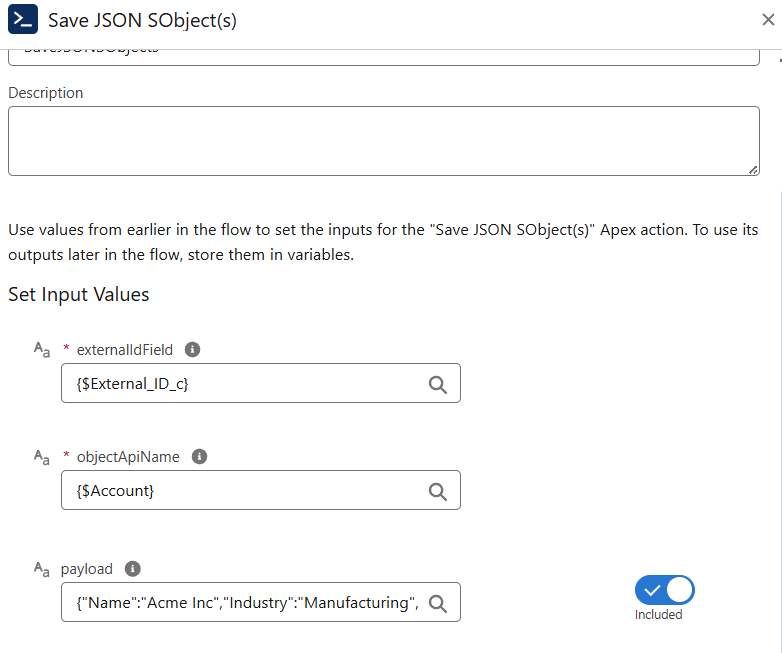
Configuring Input:
-
objectApiNameis set toAccount. -
externalIdFieldis set toExternal_Id__c. -
payloadsis set to the JSON array of accounts, for example:
[ {"Name":"Acme Inc","Industry":"Manufacturing","External_Id__c":"12345"}, {"Name":"GlobalTech","Industry":"Technology","External_Id__c":"67890"} ]
Executing Save JSON SObject(s) with Record Ids:
The component parses the JSON and performs the upsert:
-
If an account with the given external id exists, it is updated.
-
If no match exists, a new record is inserted.
-
The Salesforce Ids of all processed records are returned.
Utilizing Results:
The recordIds output can be used in subsequent Flow steps, such as:
-
Creating related Contact records with the correct
AccountId. -
Sending confirmation notifications with the Salesforce record references.
-
Branching Flow logic depending on whether records were newly inserted or updated.