Custom Transform (Apex)
Available: Developer feature (Apex required)
Overview
When the built-in Formula, Utility Flows or standard mapping actions aren’t enough, you can plug in custom Apex transforms.
A custom transform is a small Apex class that implements the Plinqx transform_Interface:
Your class implements Plinqx.transform_Interface.itransform_Interface and provides the logic in doTransform.
The transformation engine will pass both the Source Object and the Source value as input object parameters to your class.
When to use
-
You need logic that is easier/clearer in code than in a formula.
-
You must call utility methods or perform complex parsing.
-
You want a reusable transformation used by multiple mappings.
Contract
-
Signature:
Object doTransform(Object value) -
Input: The source value for the field/mapping (may be
null). -
Output: The transformed value (return the desired type; engine will coerce to the mapping’s target type when possible).
-
Side-effects: Avoid DML/callouts; keep transforms pure and fast.
-
Sharing: Use
with sharingunless you have a specific reason not to.
Implementation example
The below is an example class that implements the transform_Interface.itransform_Interface class. For this example, it is assuming a Contact Object is passed, see sample below and the value passed in from Source is FirstName Joe:
 {
	  "LastName": "Sample",
	  "FirstName": "Joe",
	  "Name": "Joe Sample",
	  "Title": "Purchasing Manager",
	  "AccountId": "001xxxxxxxxxxx",
	  "Id": "003xxxxxxxxxx"
	  "attributes": {
	    "url": "/services/data/v56.0/sobjects/Contact/003xxxxxxxx",
	    "type": "Contact"
	  }
	}
public with sharing class  SampleConcatAndUpperCaseTransform  implements  Plinqx.transform_Interface.itransform_Interface {

	// Concatenate Title (from objRecord) with value, uppercase both

	public  Object doTransform(Object objRecord, Object value) {

		String title = extractTitle(objRecord);
		String val = (value == null) ? '' : String.valueOf(value);

		// Build with a single space only when both sides are non-blank
		Boolean haveTitle = !String.isBlank(title);
		Boolean haveVal = !String.isBlank(val);

		String combined;

		if (haveTitle && haveVal) {
			combined = title + ' ' + val;
		} else  if (haveTitle) {
			combined = title;
		} else {
			combined = val; // might be empty string if value was null/blank
		}
		return combined == null ? null : combined.toUpperCase();
	}

	// Accepts either an SObject (e.g., Contact) or a Map<String, Object> payload
	private  static  String extractTitle(Object objRecord) {

		if (objRecord == null)
			return  null;

		if (objRecord instanceof  SObject) {
			Object t = ((SObject) objRecord).get('Title');
			return t == null ? null : String.valueOf(t);
		}

		if (objRecord instanceof  Map<String, Object>) {
			Map<String, Object> m = (Map<String, Object>) objRecord;
			Object t = m.get('Title');
			return t == null ? null : String.valueOf(t);
		}

		return  null; // Unknown Object

	}

}
Output: PURCHASING MANAGER JOE
Tips
-
Handle nulls defensively.
-
Validate and return the correct type (e.g.,
String,Decimal,Boolean,Date, etc.). -
Prefer small, single-purpose transforms you can compose.
Registering the class
The mapping engine activates your class via Type.forName(className):
- In your mapping configuration, set the Class Name to your Apex class
- The class must be
publicorglobaland accessible to the running.
Unit test requirement
Every custom transform must ship with a unit test.
Example:
@IsTest
private  class  SampleConcatAndUpperCaseTransform_Test {

		@IsTest
		static  void  newInstance_createsSampleUpperCaseTransform_andTransformsString() {
			Plinqx.transform_Interface  factory  =  new  Plinqx.transform_Interface();
			String  className  =  'SampleUpperCaseTransform';
			// JSON-like payload (Map) that mirrors your example; only Title is needed here
			Map<String, Object> objRecord  =
					new  Map<String, Object>{
						'Title'  =>  'Purchasing Manager'
					};

			Plinqx.transform_Interface.itransform_Interface  inst  =
			factory.newClassInstance(className);
			// Assert: type and behavior
			System.assertNotEquals(null, inst, 'Factory should return an instance.');
			Object  outVal  =  inst.doTransform(objRecord, 'hello world');
			System.assertEquals('PURCHASING MANAGER HELLO WORLD', (String) outVal,
			'Should concatenate Title + value and uppercase both.');
		}

}
Why tests matter
-
Enforce correct behaviour across orgs/environments.
-
Prevent regressions when transforms evolve.
-
Required for deployment in many pipelines and managed-package contexts.
Usage in a mapping
-
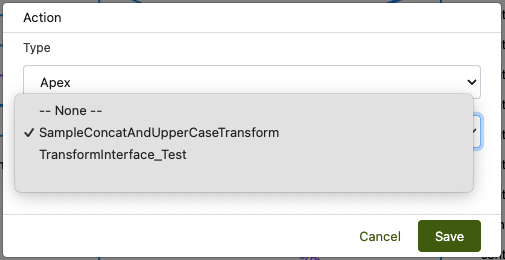
Open your Mapping → add an Action of type Apex (name may vary in UI).
-
Select the Class Name (only Apex classes that implements itransform_Interface will be listed
*implements Plinqx.transform_Interface.itransform_Interface*). -
Select the Active checkbox.
-
Click Save (the engine will call
doTransform(inputValue)during the mapping).
Best practices
-
Pure functions: No DML/callouts; return quickly.
-
Type safety: Cast and validate; throw a clear exception for unsupported input.
-
Null handling: Decide and document whether
nullreturnsnullor a default. -
Idempotency: Same input → same output.
-
Logging: Only log when essential; avoid noisy debug in production runs.
Troubleshooting
-
Type.forNamereturns null
Use the fully-qualified class name with namespace (e.g.,yourNs.MyTransform). -
Invalid typeerror
Ensure the class is public/global, compiled, and in the same org. -
Wrong output type
Return the actual type expected by the target mapping (e.g., aDecimalfor numeric fields). -
Unexpected nulls
Add guards indoTransformand unit tests for null/empty inputs.