STEP Orchestrator
Available: Starter and Premium as a paid add-on
Overview
The STEP Orchestrator Module is a powerful engine for executing complex, long-running business processes with precision and control.
It allows you to design and run orchestrations where each Step executes in isolation, with its own fresh set of Salesforce platform limits, making it ideal for resource-intensive processes.
With STEP Orchestrator you can:
- Run limit-safe executions where governor limits are reset for every step.
- Chain together Flows and Apex classes seamlessly.
- Pass inputs and outputs between steps, creating context-aware workflows.
- Control execution through manual, scheduled, or triggered runs.
- Monitor, pause, retry, and resume orchestrations with full runtime control.
How it Works
Each Orchestration is made up of a sequence of Steps:
-
Step Block
Each step runs in its own governor limit container (block), ensuring that large or complex processes do not hit Salesforce’s transaction limits. -
Step Types
A step can run:- A Flow (Autolaunched)
- An Apex class (Interface)
-
Inputs and Outputs
- Every step has Inputs (parameters it consumes) and Outputs (data it produces).
- Outputs from previous steps can be mapped as inputs into subsequent steps.
-Repeat steps - A step can execute repeatedly, passing data from its own outputs or from steps above back into itself, continuing until its completion criteria are met. - This creates stateful step chaining, enabling data to flow through the orchestration.
-
Job Lifecycle
For each step:
Job → RUN → Result → Outputs
Diagram
Below is a high level architecture representation of STEP Orchestrator:
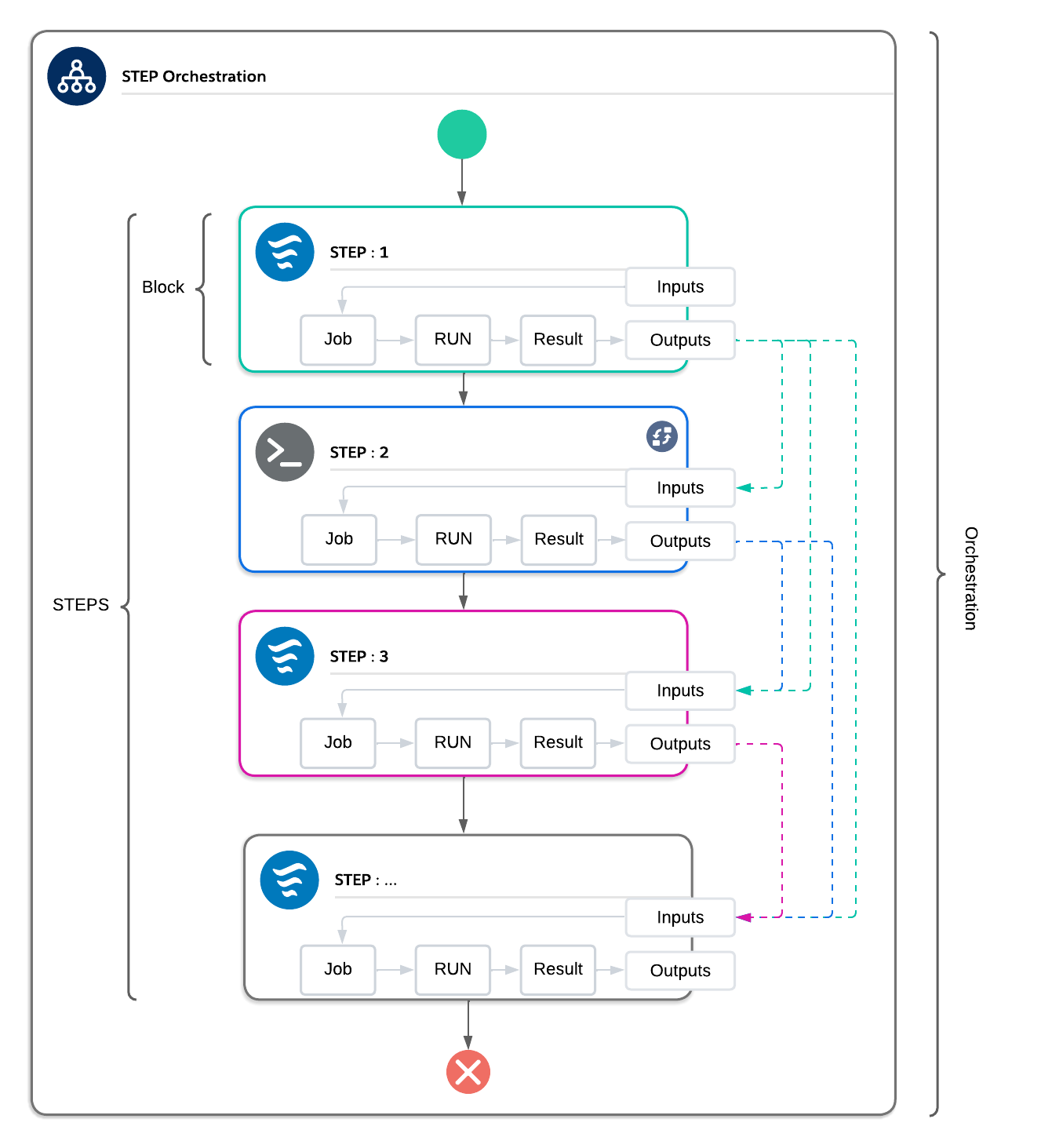
- Each Step execution, executes independently with fresh limits.
- Outputs of steps can be chained as Inputs into later steps.
- Orchestrations can contain many steps (Flows or Apex), forming a complete process.
Benefits
- Scale Safely — Following best practices, lower your risk of hitting Salesforce governor limits across a long-running orchestration.
- Resilient Processes — Retry failed steps or resume paused orchestrations without starting over.
- Dynamic Orchestration — Pass data dynamically between steps for smarter, context-driven processes.
- Flexibility — Mix Flows and Apex in the same orchestration.
- Visibility & Control — Monitor, manage, and recover from orchestration runs.
Example Use Cases
-
High-Volume Data Processing
Break up record processing into multiple steps so each executes with fresh limits. -
Hybrid Flow & Apex Orchestration
Run Flows for declarative automation and Apex for advanced logic within one orchestration. -
External System Coordination
Chain together API callouts and Salesforce updates across multiple steps.
Conclusion
The STEP Orchestrator Module is your intelligent execution layer for distributed logic in Salesforce.
By combining limit-safe execution, step chaining, and runtime controls, it provides the reliability, scalability, and flexibility required for complex enterprise processes.
📄️ Designing Steps
Available: Starter and Premium as a paid add-on
📄️ Using Step Designer
Available: Starter and Premium as a paid add-on
📄️ Executing Flow Steps
Available: Starter and Premium as a paid add-on
📄️ Executing Apex Steps
Available: Starter and Premium as a paid add-on