LWC Example
Overview
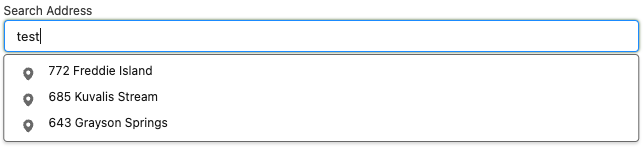
This example demonstrates the implementation of the Plinqx FlowService wrapper in a Lightning Web Component (LWC). The example focuses on a practical application where the LWC component interacts with an external address search service via a Plinqx flow.
Scenario
The LWC component in this example is designed to perform a dynamic address search. It leverages a Plinqx flow that makes a callout to an external mock address service, retrieves a list of addresses matching the search criteria, and displays the results in the component.
Note: The address service used here is a mock service for demonstration purposes. It returns random results without applying any specific search logic.
LWC Component Functionality
-
The LWC component is triggered by an onchange event.
-
Upon triggering, it calls the Plinqx service flow, which then makes an external callout and returns the service responses.
Code Implementation
import { LightningElement, track } from 'lwc';
import { ShowToastEvent } from 'lightning/platformShowToastEvent';
import callFlowWithResponse from '@salesforce/apex/Plinqx.FlowService.callFlowWithResponse';

const flowApiName = 'FlowService_Example';

export default class LwcServiceWrapperDemo extends LightningElement {
  @track results = [];

  handleSearchAddress(event) {
    this.results = [];
    let objParams =
      //the flow input paramaters as an object
      {
        searchParam: event.detail.value, //set the input parameter of the flow
      };
    callFlowWithResponse({
      flowNameSpace: '', //The flow namespace if from package i.e. Plinqx
      flowAPIName: flowApiName, //The flow API Name
      flowParams: objParams, //The flow input paramaters
      flowResponseVariable: 'addressResponse', //The output paratemeter of your flow to retrieve
    })
      .then((result) => {
        this.results = result;
      })
      .catch((error) => {
        this.handleNotification('Address Search', error.message, 'error');
      });
  }

  handleResultClick(event) {
    //implement result click logic here
  }

  handleNotification(title, message, variant, mode) {
    this.dispatchEvent(
      new ShowToastEvent({
        title,
        message,
        variant,
        mode,
      })
    );
  }
}
<template>
  <div class="slds-form-element">
    <div class="slds-form-element__control">
      <lightning-input
        autocomplete="disable-autocomplete"
        type="text"
        label="Search Address"
        placeholder="type address to search....."
        onchange="{handleSearchAddress}"
        value="{searchAddress}"
      ></lightning-input>
    </div>

    <div>
      <ul class="slds-listbox slds-listbox_vertical slds-dropdown slds-dropdown_fluid">
        <template for:each="{results}" for:item="result">
          <li key="{result.key}" class="slds-listbox__item" role="presentation">
            <div
              class="slds-media slds-listbox__option slds-listbox__option_entity slds-listbox__option_has-meta"
            >
              <div class="slds-media__figure slds-listbox__option-icon">
                <lightning-icon
                  icon-name="utility:checkin"
                  alternative-text="checkin"
                  size="xx-small"
                  title="xx-small size"
                ></lightning-icon>
              </div>
              <div class="slds-media__body">
                <div
                  role="option"
                  tabindex="0"
                  class="slds-listbox__option-text slds-listbox__option-text_entity"
                  onmousedown="{handleResultClick}"
                  data-id="{result.key}"
                >
                  {result.address}
                </div>
              </div>
            </div>
          </li>
        </template>
      </ul>
    </div>
  </div> </template
>;
<?xml version="1.0" encoding="UTF-8"?>
<LightningComponentBundle xmlns="http://soap.sforce.com/2006/04/metadata">
    <apiVersion>58.0</apiVersion>
    <isExposed>true</isExposed>
    <targets>
        <target>lightning__RecordPage</target>
    </targets>
</LightningComponentBundle>
Other Configuration
Setting Up Named Credential:
-
Label: Plinqx Demo
-
**Name: **Plinqx_Demo
-
**Identity Type: **Anonymous
-
**Authentication Protocol: **No Authentication
This named credential setup is crucial for securely calling the external mock address service from the Plinqx flow.
Package Installation
For practical demonstration, an unmanaged package of this LWC example is available. Use the links below to install it in your Salesforce environment:
Sample Response
Below is an example of the response returned by the demo address service. Note that results will vary with each search, reflecting the mock nature of the service.
[
  {
    "key": 0,
    "id": "0b842ba6-4083-48cb-8550-00f89811c4ec",
    "address": "045 Johanna Loaf",
    "country": "Malta"
  },
  {
    "key": 1,
    "id": "d1c45c38-2c7d-49c7-8882-6ac12a217fc2",
    "address": "26905 Stark Inlet",
    "country": "American Samoa"
  },
  {
    "key": 2,
    "id": "52d7d979-5366-454f-a094-cdd51dacbf1f",
    "address": "81561 Yundt Valley",
    "country": "Monaco"
  },
  {
    "key": 3,
    "id": "735b15fc-1bdd-472e-a721-c8f328d732aa",
    "address": "3356 Jacinto Locks",
    "country": "Bolivia"
  },
  {
    "key": 4,
    "id": "3c006538-2047-45f3-bc3b-5214f7a561a7",
    "address": "2067 Wilderman Groves",
    "country": "Sweden"
  },
  {
    "key": 5,
    "id": "d1551e3f-b369-462e-940f-4a2f18eec029",
    "address": "9571 Swift Well",
    "country": "Bouvet Island (Bouvetoya)"
  }
]
End Result
Conclusion
This example serves as a practical illustration of integrating Plinqx FlowService wrapper within an LWC. By following this example, developers can understand how to leverage Plinqx for external service integrations in a Salesforce LWC environment.